



教程說明:
這個方法可以說簡單粗暴,雖說操作有點小重復,但比手動好多了,只適用于電腦用戶。
教程步驟:
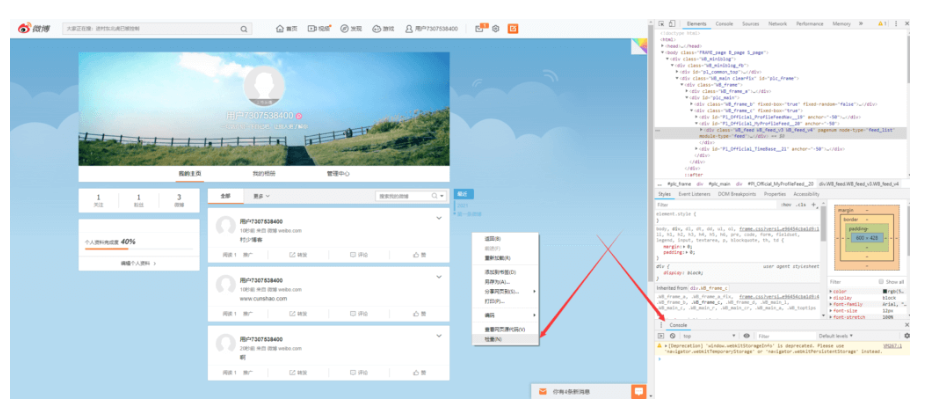
1.電腦進入自己微博主頁->然后右鍵鼠標->審核元素->點下面的
2.第二個英文“Console”->復制粘貼全部代碼放入>符號空白處
3.回車一下就可以了->一次能刪一頁的內容->大概40~50條左右
PS:如果彈出提示出現錯誤或系統繁忙又或者停止了,你點微博下一頁會繼續刪或者再放一次代碼回車下再次操作,不想繼續刪了,按F5就刷新頁面停止了。
![圖片[1]-利用審查元素簡單快速批量刪除微博內容](http://m.oilmaxhydraulic.com.cn/wp-content/uploads/2022/02/1024x432.png)
代碼如下:
// ==UserScript==

// @name         Weibored.js

// @namespace    https://vito.sdf.org

// @version      0.2.0

// @description  刪除所有微博

// @author       Vito Van

// @match        https://weibo.com/p/*

// @grant        none

// ==/UserScript==

'use strict';

var s = document.createElement('script');

s.setAttribute(

'src',

'https://lib.sinaapp.com/js/jquery/2.0.3/jquery-2.0.3.min.js'

);

s.onload = function() {

setInterval(function() {

if (!$('a[action-type="feed_list_delete"]')) {

$('a.next').click();www.x6d.com

} else {

$('a[action-type="feed_list_delete"]')[0].click();

$('a[action-type="ok"]')[0].click();

}

// scroll bottom let auto load

$('html, body').animate({ scrollTop: $(document).height() }, 'slow');

}, 800);

};

document.head.appendChild(s);? 版權聲明
THE END








暫無評論內容